

Between 31 March and 29 October 2026, SEOPress went from version 9.7 to 10.4, through 9.8, 9.9, 10.0, 10.1, 10.2 and 10.3. If your site is still on 9.x or an early 10.x, here is the short version: update SEOPress and SEOPress PRO to 10.4 together, then run the checks at the end of this article.
Two reasons make 10.4 the version to be on. It closes four security issues with public CVE entries, the newest published on 30 October. And the releases since 9.7 changed how SEOPress looks and what it can do, including an AI assistant that is switched on by default in PRO.
None of the four security issues was reported as actively exploited in the Patchstack entries we read on 9 November 2026. This is routine maintenance, not an emergency, but it should not wait for months.
The security fixes
| Fixed in | Issue | Who could exploit it | Severity (Patchstack) |
|---|---|---|---|
| 10.4, 29 Oct 2026 | Stored cross-site scripting in 10.3 and earlier (CVE-2026-116535) | A logged-in Subscriber, and an administrator or editor must then take an action, such as opening a crafted link | CVSS 6.5 |
| 10.3, 1 Oct 2026 | Stored cross-site scripting through the author name, in 10.2 and earlier (CVE-2026-96564) | Listed as needing no login, but only on sites where the Google Analytics or Matomo “track authors” option is on | CVSS 7.1 |
| 10.3, 1 Oct 2026 | Stored cross-site scripting in an analytics setting, in 10.2 and earlier (CVE-2026-101357) | A logged-in Subscriber, and only if an administrator gave that role access to the Analytics settings | CVSS 4.9 |
| 10.2, 2 Sep 2026 | Server-side request forgery in 10.1 and earlier (CVE-2026-85305) | A logged-in Contributor | CVSS 5.4 |
The changelog also lists security hardening without a CVE in several releases. Version 9.7 fixed an “unsafe call_user_func_array with user-controlled input” and hardened its REST API and AJAX endpoints. Version 9.8 rate-limited destructive command endpoints and tightened REST API permission checks. Versions 10.0, 10.1, 10.3 and 10.4 list further hardening.
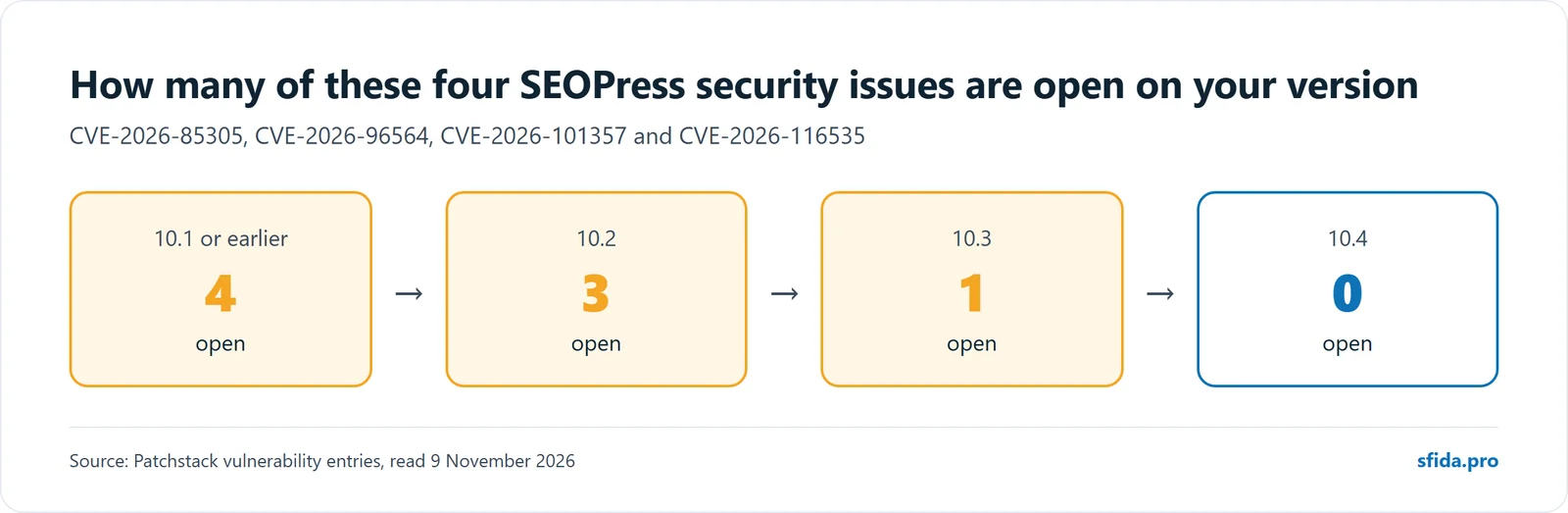
If you are on 10.3, one of these issues is still open on your site. On 10.2 there are three, and on 10.1 or earlier all four.
What else changed, release by release
Release dates and contents below come from the official SEOPress changelog, which we last read on 9 November 2026.
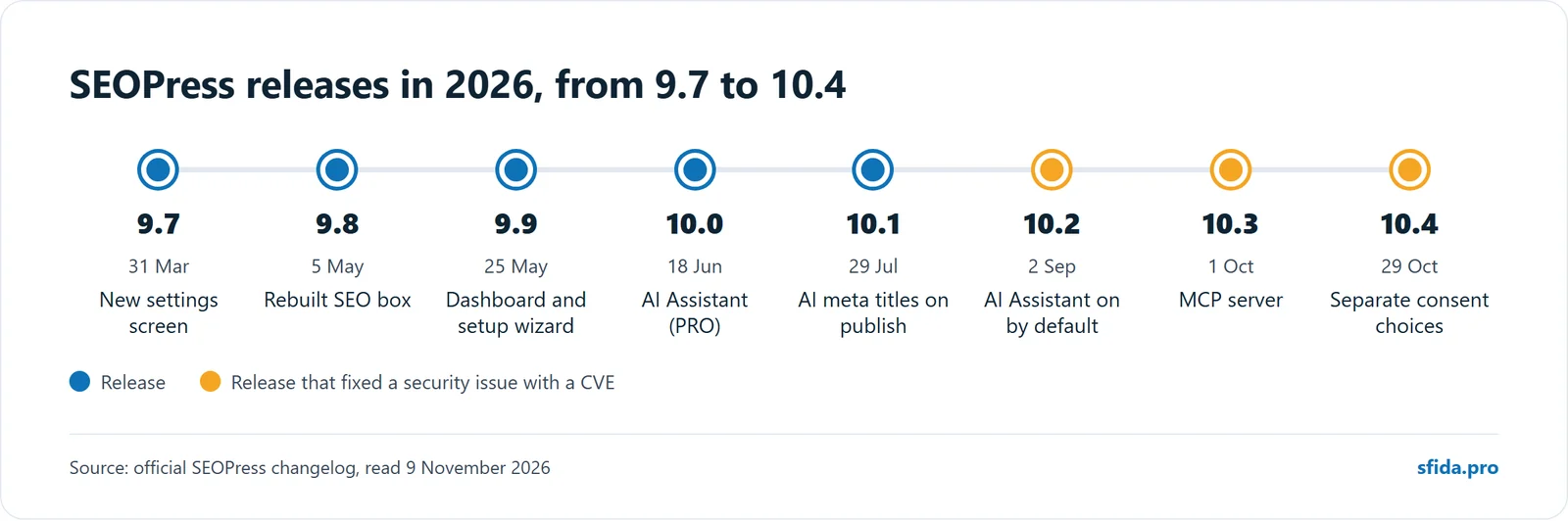
9.7 (31 March). A new settings screen, the first step of a redesign. SEOPress now detects transliterated keywords in permalinks, which helps sites whose language has accented letters. PRO added a Bingbot crawl-delay button in the robots.txt editor, all public post types in llms.txt, and social profiles in the Author schema. The FAQ, HowTo and Course schemas were marked as deprecated.
9.8 (5 May). A rebuilt SEO box in the editor, and a command palette (Ctrl+K) to jump to any setting. The minimum WordPress version became 6.5. PRO gained a new Site Audit screen and a schema editor with a live preview. Five point releases followed in the same week, mostly fixing how the new SEO box saves.
9.9 (25 May). A new SEO dashboard and setup wizard, one-click migration from SureRank and SmartCrawl, and an accessibility overhaul of the admin screens to WCAG 2.1 AA.
10.0 (18 June). The AI release. PRO added an AI Assistant inside the block editor. You can buy tokens from SEOPress or connect your own OpenAI, Google Gemini or Anthropic Claude account. SEOPress also added support for the WordPress Abilities API (WordPress 7 and later), a sitemap health check, and a Google “preferred sources” button.
10.1 (29 July). PRO can write meta titles and descriptions with AI when a post is published, and you can restrict AI features to chosen user roles. Site Audit gained a Technical tab, robots.txt gained a revision history, and WooCommerce product schema gained variable products, sale prices and return policies. llms.txt now works with WPML and multisite.
10.2 (2 September). The AI Assistant is now on by default in the PRO editor, and the setup wizard has a step to connect an AI provider. PRO also gained opening hours per page for Local Business schema and a “Test URL” button for redirects. It is tested with WordPress 7.1 and PHP 8.5.
10.3 (1 October). An MCP server, which lets AI tools such as Claude, ChatGPT or Cursor read and change SEO settings: 14 tools in the free plugin and 13 more in PRO. It supports read-only connections, tool-by-tool control and one-click revocation. The cookie banner now works with page caching plugins such as WP Rocket. Google Analytics 4 gained optional cross-domain and 404 tracking, and PRO shows a 12-month Search Console chart in the dashboard. It also fixes PRO Google Analytics connections made since 10.2.
10.4 (29 October). The cookie banner now lets visitors allow analytics and advertising separately, and each Google Consent Mode v2 signal follows its own category. Instant Indexing keeps a history of every URL it submitted. The MCP server gained seven tools for categories and tags, and an easier way to connect. In PRO you can review, edit and approve bulk AI suggestions before they are saved, and set a primary term on any hierarchical taxonomy. The content analysis column now shows how many checks passed (for example 12/17), and a new alert warns you when a post type with published content is set to noindex. Two fixes are worth knowing: the setup wizard no longer saves the admin email as the public email in the Organization schema, and the Classic Editor no longer risks erasing the SEO title and meta description when you click Update.
What to check after you update
- Versions. In wp-admin, go to Plugins and confirm both SEOPress and SEOPress PRO show 10.4 or later.
- The AI Assistant. Since 10.2 it is on by default in PRO. Decide whether you want it. If you do, limit it to the right roles and check which AI provider it uses and who pays for the tokens.
- The MCP server. Look at its settings and see whether anything is connected. If you use it, give AI tools read-only access unless they need to change things, and revoke any connection you do not recognise.
- Your SEO output. View the source of a few pages and confirm the title, meta description and structured data are still there. Open your XML sitemap and confirm it loads.
- Google Analytics. If you connected it through SEOPress PRO after updating to 10.2, check that data is arriving.
- The email in your Organization schema. If you ran the SEOPress setup wizard before 10.4, open the Knowledge Graph settings and check the email is one you want public. Earlier versions could save the admin email there.
- The cookie banner. If you use SEOPress’s own banner, check the new separate choices for analytics and advertising match your consent setup.
- Old FAQ markup. Google stopped showing FAQ rich results on 7 May 2026, according to its Search Console data anomalies page. FAQ rich results no longer appear in Google Search, so adding FAQ markup will not bring them back.
A trap we see often: no update notice
Premium plugins installed from a zip file often have no licence activated on that site. When that happens, WordPress shows no update notices for them. If SEOPress PRO is unlicensed on your site, nobody may ever tell you an update exists.
Do not rely on the notice. Check the version number yourself.
How to update safely
- Take a fresh backup stored off the server, not only on the same hosting account.
- Update SEOPress and SEOPress PRO together, so the two stay matched.
- Run the checks above.
If PRO shows no update available but is behind 10.4, you need the current release from your licence account or your developer.
How we handle this on sites we look after
On sites in our care, plugin updates go out in a weekly cycle. Every cycle starts with a fresh off-site backup and finishes with checks on the live site.
Not sure which version you are on?
We will check which version you are on, update it and confirm your SEO output still works. Request a quote.
See our Website Care Package and managed WordPress hosting, or contact us and we will look at your site.
Get our next article by email
Practical notes from our client work on WordPress, SEO and Google Ads. One email a month at most, and only when something new is out. Unsubscribe anytime. Privacy policy