
If you run Search campaigns and your results look better than your real customers suggest, check where your ads are actually showing. Search campaigns can be switched to also run on partner sites and on the Display Network. On those, clicks can be cheap and look good in the report, and some of them may be invalid. This article shows the warning signs, what Google will and will not do about it, and a weekly check you can run yourself. (Google calls fake clicks “invalid clicks”, and we use that term below.)
Quick summary
- A Search campaign can be set to include Google’s search partners and the Display Network. Neither is limited to people typing a query on Google.
- Warning signs: far more ad clicks than analytics sessions, contact clicks in the middle of the night, and “conversion rates” that are too good.
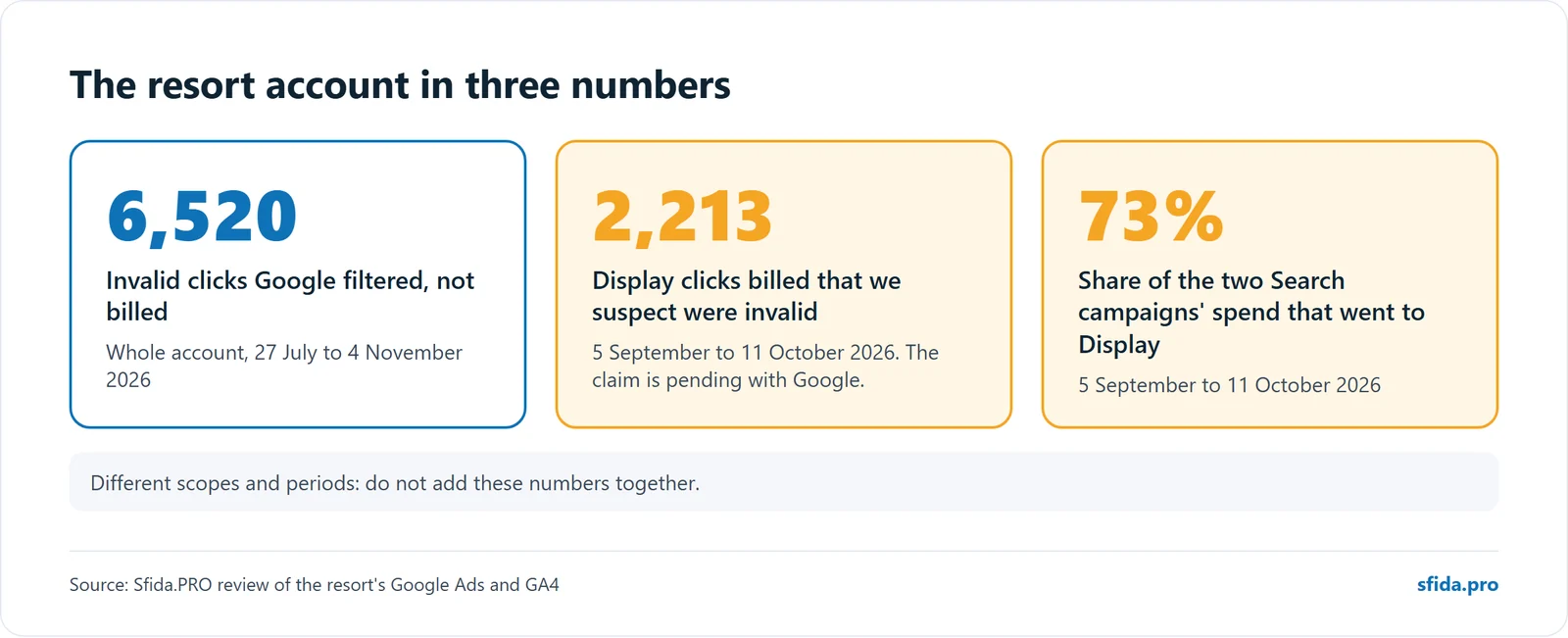
- At a four-star resort in Albania, Display took 73% of two Search campaigns’ spend between 5 September and 11 October 2026. Google filtered 6,520 invalid clicks across the whole account, and we found 2,213 more Display clicks that were billed.
- Google credits some invalid clicks automatically and investigates others on request, but only for the last 60 days.
- Check weekly, and file as soon as the evidence is clear. Waiting cost us part of our own claim.
How does the Display Network end up inside a Search campaign?
When you create a Search campaign, its network settings decide where the ads may run. Two options matter here.
Search partners. Google’s help page says search partners are included by default in Search campaigns. Ads can show on partner sites, including search results lists, site directories, product detail pages and YouTube search results. The same page notes that clicks from partner sites that display products may not be highly targeted.
Display Expansion. This setting, “Include Google Display Network”, lets a Search campaign also show ads across Google’s Display Network. Google’s help page on Display Expansion on Search campaigns describes it as a way to reach additional potential customers using your Search campaign settings. The same page says that from February 2027, Search campaigns with Display Expansion will automatically move to channel prioritisation. Read the page before you rely on the old behaviour.
Both can be switched on by a setup wizard, by a recommendation someone applied, or by a previous agency. The budget you meant for people searching for your pool day pass, hotel room or service can end up on a banner on a website that has nothing to do with you.
What do invalid clicks look like?
Google filters much of this itself (more on that below). What gets through you can usually spot from your side without special tools:
- Clicks far above sessions. Compare the ad clicks for a campaign with the Google Analytics 4 sessions from the same campaign. A large gap means visitors left before the page loaded, or never arrived.
- Contact clicks at night. If your venue is a daytime business and half the phone or WhatsApp button clicks arrive between midnight and 6 a.m. in your time zone, look closer, unless you sell to guests who really do book from other time zones.
- Odd placements. The placement report shows where the ads ran. If most of the cost sits on a handful of sites with no link to your business, that is a finding.
- Conversion rates that are too good. A rate well above your normal one is a warning, not a win, when the “conversion” is a button click.
What did we find at a resort in Albania?
A four-star resort with a pool and a restaurant had two Search campaigns, one for the pool day pass and one for the restaurant. The Display Network was switched on inside both. Display traffic started in the week of 27 July 2026 and grew sharply from mid-August.
Google filtered 6,520 invalid clicks across the whole account between 27 July and 4 November 2026, including campaigns our claim does not cover, and did not bill them. But 2,213 more Display clicks were billed between 5 September and 11 October. In that period Display took 73% of the two Search campaigns’ spend.
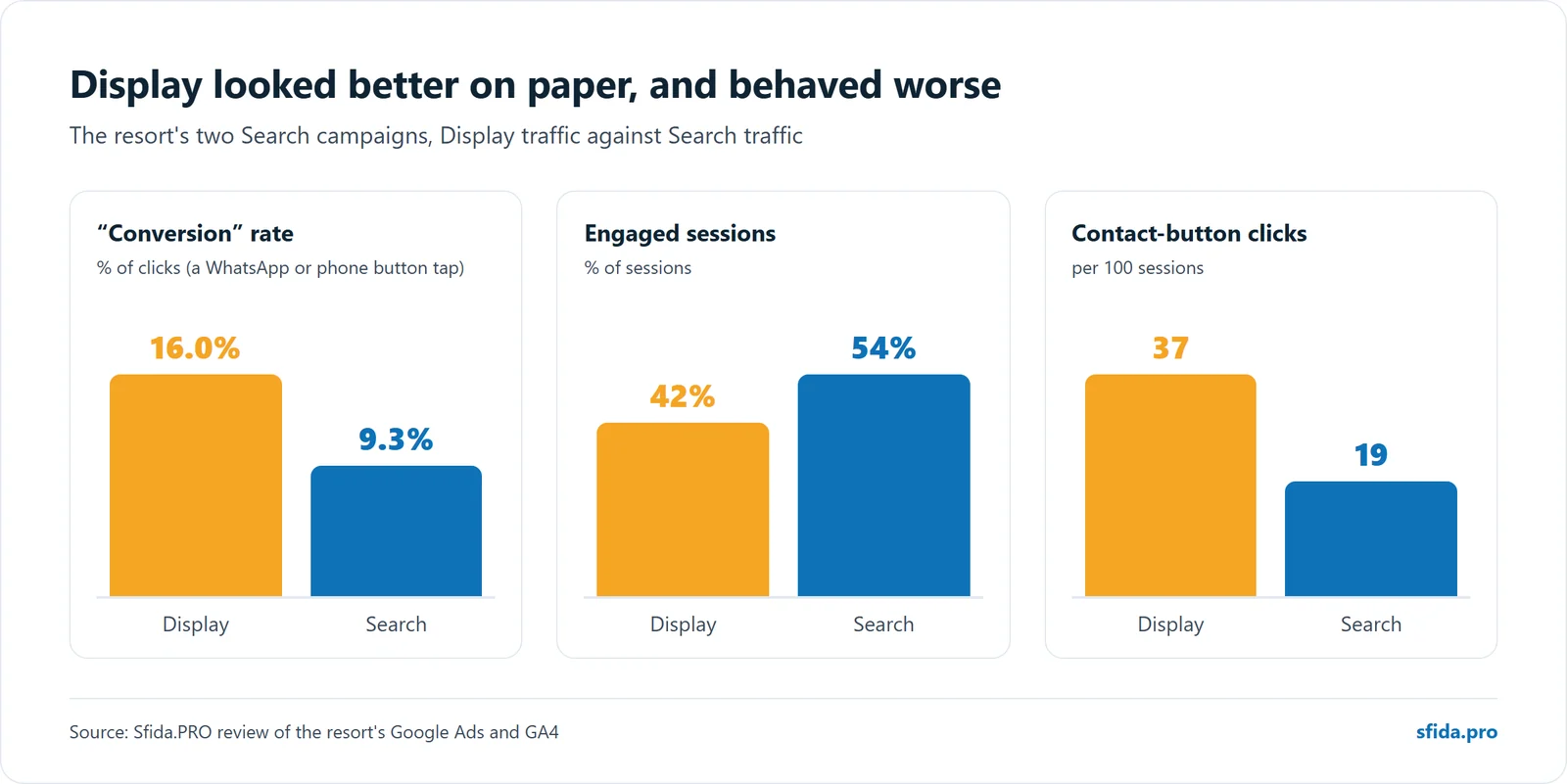
On paper it looked good: Display “converted” 16.0% of clicks against 9.3% for Search. A conversion there was a click on the WhatsApp or phone button, so we checked the traffic behind it:
- Those 2,213 clicks produced 1,749 sessions, and visitors engaged less than Search visitors (42% against 54%).
- They clicked the contact buttons about twice as often: 37 per 100 sessions, against 19 for Search.
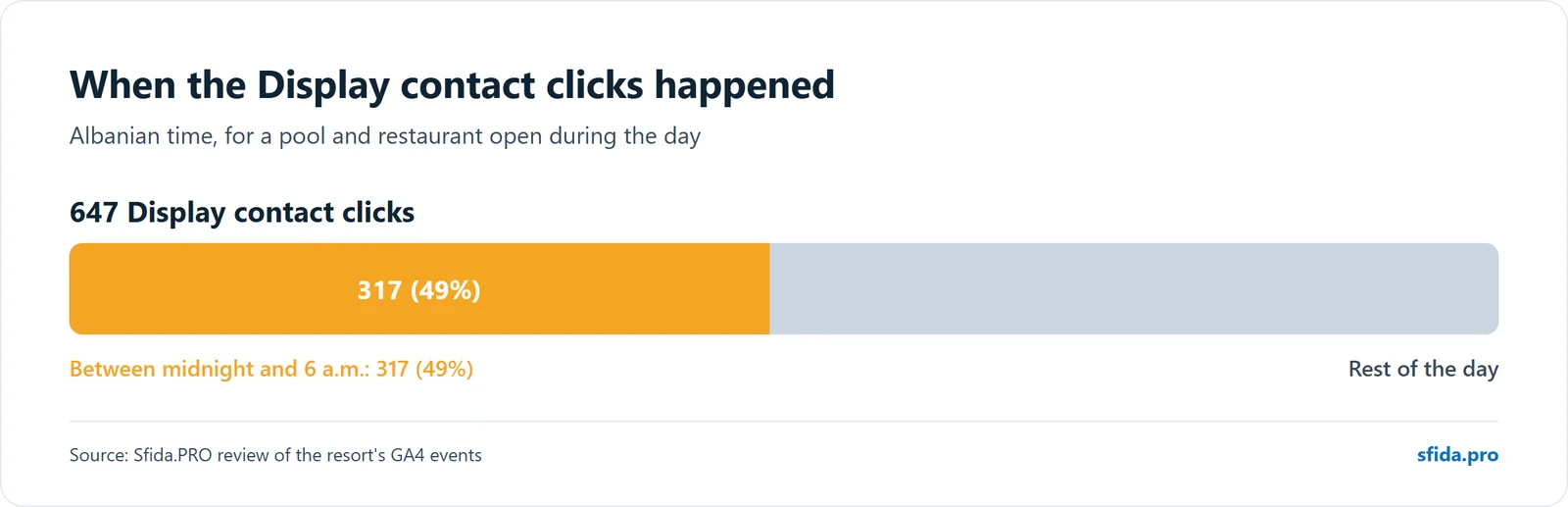
- Of 647 Display contact clicks, 317 (49%) came between midnight and 6 a.m. Albanian time, for a daytime venue.
- Twelve placements took 89% of the Display cost, none related to a hotel, pool or restaurant in Albania.
We switched Display off, stopped the two campaigns after 11 October and filed a click-quality claim with Google on 4 November 2026. The claim is pending. Google decides case by case and has not told us the outcome, so we do not count a refund as a result.
How do Google’s credits and claims work?
According to Google’s page on managing invalid traffic:
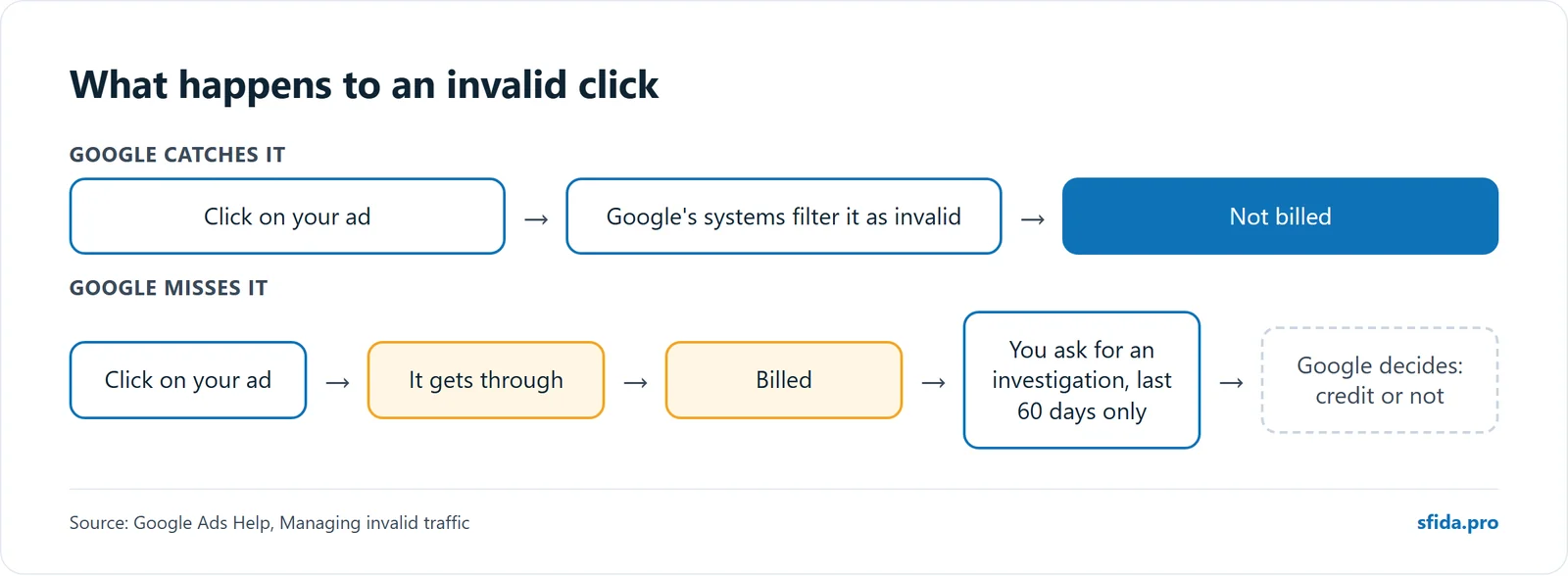
- If invalid traffic is found after the billing cycle ends, Google automatically issues an invalid activity credit in the next billing cycle. It shows as an “Invalid activity” adjustment on your invoice.
- If you think Google’s systems missed some, you can ask for an investigation through the Click Quality Form. Google specialists evaluate your traffic from the last 60 days.
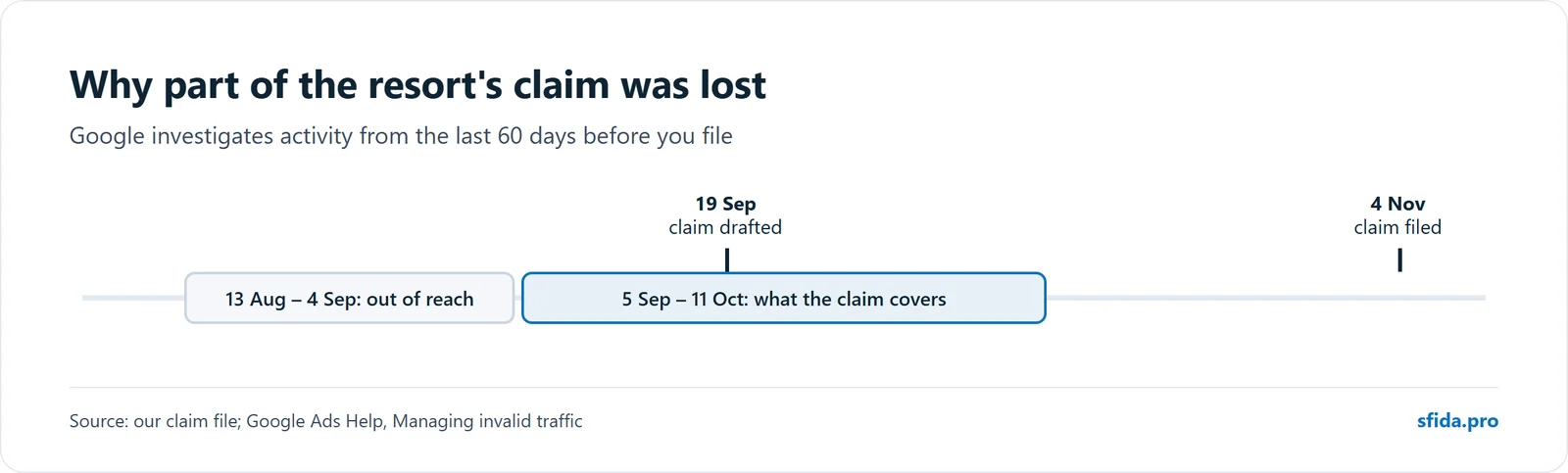
That 60-day limit is the lesson of our own case. We drafted the resort’s claim on 19 September and filed it on 4 November. By then the part of the period from 13 August to 4 September was out of reach, and the claim covers 5 September to 11 October. The evidence was there. We were late.
Google may also limit how often you can request an investigation. We could not confirm the exact limit on Google’s public pages, so check it on the form or with your Google contact before planning around it. Either way, do not leave a claim sitting as a draft.
What should you change?
- Turn off Display Expansion and search partners on Search campaigns unless you have agreed to them and have a reason. This is our default on every account.
- Turn off auto-applied recommendations, so nobody’s click re-enables a network.
- Keep soft actions secondary. Fake clicks are hard to hide when the report counts bookings and leads, as we explain in conversions are not bookings.
- Exclude placements that are not real publishers, if you run any Display at all.
A weekly check you can do yourself
- In Google Ads, break the last 7 days down by campaign and by network. Note the invalid clicks and the cost for each.
- Compare each campaign’s clicks with the GA4 sessions from the same campaign.
- Look at contact clicks by hour. Anything at night for a daytime business is worth a look.
- Open the placement report for any campaign with Display or partner traffic.
- If something is clearly wrong, write it down with dates and numbers. Do not wait for the next review.
What to do this week
- Open each Search campaign’s network settings. Is “Include Google search partners” or “Include Google Display Network” ticked? Did you agree to it?
- Break the last 30 days down by network. How much of the cost went to Display or partners?
- Compare ad clicks with GA4 sessions for the same campaign.
- Look at the hour of day for your phone and WhatsApp clicks.
- Check the placement report for sites you do not recognise.
- If invalid clicks were billed in the last 60 days, file the click-quality form now and keep the evidence.
Want someone to watch this every week?
On every account we run, we check invalid clicks per campaign and network every week, compare clicks with sessions, review placements and file claims with Google promptly. See our Google Ads and Meta Ads management service, then request a quote or book a call. The same discipline applies on Meta: read a form event is not a lead.
Get our next article by email
Practical notes from our client work on WordPress, SEO and Google Ads. One email a month at most, and only when something new is out. Unsubscribe anytime. Privacy policy